
TimeTune 4.13 is here with new features and improvements! 🎉
Let’s take a look at the most important changes in this version:
NEW ONBOARDING SCREENS
We’ve been receiving for a while now some reviews in Google Play indicating that the app seemed ‘too basic’ compared to other apps 🤔
Those reviews came from new users who -after installing the app for the first time- didn’t discover some of the most important features in TimeTune (like templates, statistics or custom notifications).
However, it was understandable. When we re-examined our onboarding process we realized that it basically was… non-existent 😅 Since version 4.0, our onboarding process was just a ‘Welcome!’ screen and nothing else:

In an effort to simplify our onboarding process, we ended up forcing users to discover the value of the app by themselves. We thought we were doing users a favor, but it was far from it 🫠
One of the most important goals when onboarding new users is to show them what they can expect from an app, so they don’t get lost trying to figure everything out.
That’s why we redesigned our onboarding screens from the ground up, using the Duolingo app as our inspiration (we love Duolingo’s onboarding a lot!):

In fact, we had already tried Duolingo’s approach many versions ago and we liked it. Now we’re trying it again but adapted to our current features.
The new onboarding process is not perfect. We’ll have to refine it progressively. But it’s certainly better than our previous (non-existing) setup.
All users can see the new onboarding screens here: Top menu / Help / Reset welcome screens.
SWITCHING TEMPLATE CALENDAR AND STATISTICS
In TimeTune 4.13 we’re switching the places where you can access the template calendar and your statistics:

Logically, it makes more sense to integrate the template calendar into the ‘Schedule’ section (as they both allow you to ‘schedule’ things) and give statistics their own section in the main menu.
In addition to that, having the daily schedule and the template calendar together will allow us to try new integration paths in future updates ⚗️
NEW APP SHORTCUT: FOCUS MODE
In the last version we added a widget button to enter focus mode with a single tap. Understandably, users who don’t use the widget also asked for a way to open focus mode that quickly.
That’s why in TimeTune 4.13 we’re adding a new app shortcut with the same purpose. You can add that shortcut to your homescreen and open focus mode directly:
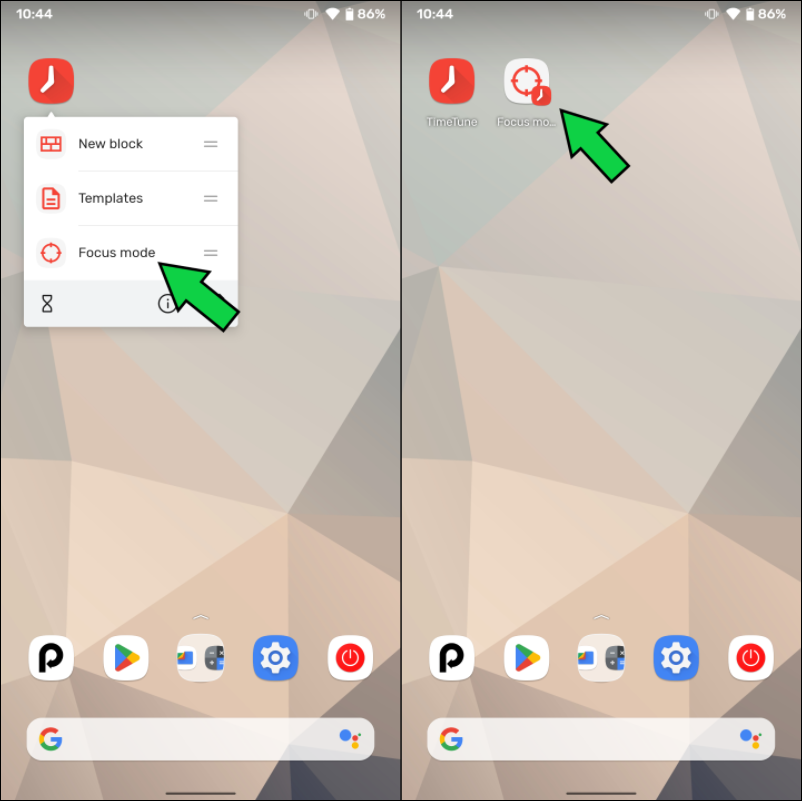
⚠️ Remember that focus mode is a Premium feature.
‘SAVE AS TEMPLATE’ WITH NOTIFICATIONS
So far, when you saved a schedule day as a template, the app didn’t save the original block notifications.
Not anymore! 🙅♂️
Starting TimeTune 4.13, the ‘Save as template’ feature also saves the notifications, regardless of whether they come from individual blocks or template blocks:

BUG FIX: SCHEDULE DUPLICATION
Some of you may have encountered a rare bug that randomly duplicated all the blocks in the schedule 🐛
That error was caused by what is known as a ‘race condition‘. Race condition bugs are especially difficult to find, test and reproduce 😖
After a thorough investigation (and a lot of coffee!) we’re happy to say that the bug won’t happen anymore. It was properly trapped and removed 🥳
ONE-TIME PURCHASE TEST CONTINUES
In our last version we started a one-time purchase test:

The goal was to find the right combination of purchase options that would give users enough flexibility while still being profitable for the project.
We haven’t made a final decision about the one-time purchase option staying or not, so the test continues.
Remember, if you don’t like subscriptions you still can get a lifetime license in version 4.13 🤩
OTHER CHANGES
As it happens in each version, there are other internal and additional changes:
- Library updates.
- Internal app restructuring.
- Adaptation to Google’s granular consent when signing in to Google Drive.
- The app now asks for notification permission during onboarding.
- Notification settings will show a warning if the notification permission is disabled.
- All helping tips have been redesigned.
- All empty states have been redesigned.
- New style for colored icons.
- The app shows a purchase mini-button on the free version.
- Statistics now have a ‘Go to current time’ option.
- Other design tweaks.
- Other bug fixes.
We hope you like the new changes!
Stay tuned for more and enjoy your time! 😀
(Top illustration by gstudioimagen, on Freepik)
Thank you for such a great app . I subscribed yearly to support you guys. Keep adding new features.
I would suggest nesting tags maybe add another level. Sub tags would be helpful for me
Thank you very much for your support! 🥰 We’ll be adding improvements progressively 😀
How to change the voice of the notification (play voice option)
Hi! The app uses the voice that is defined in the device settings (usually found on Settings/System/Language). If you change it there, the app will adapt 😀